

Make sure your WordPress emails get delivered.
Reliable SMTP delivery, testing, monitoring and failover for WordPress.
- Easy setup
- WooCommerce ready
- Works with any SMTP provider
- WordPress.org rating · 1 review
- 5 out of 5 stars
- Requires WordPress · tested to 7.1.2
- 5.5+
- Mailers, 15 with Pro
- 7
- Guided setup wizard
- 4 steps
Compatibility
- WooCommerce
- Contact Form 7
- WPForms
- Gravity Forms
- Elementor forms
- Membership & LMS plugins
- WordPress core
- SMTP
- Amazon SES
- SendGrid
- Mailgun
- Brevo
- SMTP2GO
- PHP mail
- Postmark PRO
- Resend PRO
- MailerSend PRO
- Mailjet PRO
- Elastic Email PRO
- ZeptoMail PRO
- Gmail (OAuth) PRO
- Outlook (OAuth) PRO
Anything that sends through WordPress's wp_mail() goes through Cybex WP SMTP — no per-plugin setup. The email log shows which plugin or theme sent each message.
WordPress email fails quietly.
By default WordPress hands mail to the web server with no authentication and no log. Receiving servers treat it as unverified — and you find out when a customer complains.
Password resets don’t arrive
Locked-out users open a support ticket instead of signing in.
WooCommerce emails disappear
Customers think the payment failed, then order twice or dispute the charge.
Form notifications are missed
A lead fills in your contact form and nobody on your side ever hears about it.
Nothing says it failed
PHP mail() is throttled or blocked by many hosts, and WordPress keeps no record of what was sent.
Reliable email delivery, with visibility and control.
Cybex WP SMTP connects WordPress to your own SMTP or email delivery provider, then keeps watching every message after the swap.
Reliable delivery
Mail goes out through an authenticated provider you choose — Amazon SES, SendGrid, Mailgun, Brevo or any SMTP server — instead of PHP mail().
- Setup wizard for each mailer
- Force-from controls
- Test email and connection trace
Delivery visibility
Every message is logged with its recipient, status, the plugin that sent it and your provider’s message ID.
- Search, filters and CSV export
- Deliverability score
- Failure alerts by email
Recovery & failover
A failed send is held and retried on a widening schedule instead of being lost. Pro adds a backup mailer that takes over.
- Automatic retry
- Sending pauses on a broken mailer
- Backup mailer in Pro
Everything you need to run site email properly.
Five of these six are in the free plugin. Failover is Pro.
- /setupFREE
SMTP setup
A four-step wizard connects SMTP, Amazon SES, SendGrid, Mailgun, Brevo or SMTP2GO. Keep several mailers and pick which one sends.
- /testFREE
Test email
Send a test from wp-admin and trace the handshake with your mail server step by step, so you see exactly which step fails.
- /logFREE
Delivery logs
Every message with subject, recipient, status and sending plugin — searchable, filterable and exportable to CSV.
- /dnsFREE
SPF / DKIM / DMARC checks
Your sending domain checked against your mailer, with the record found and the exact DNS change to make.
- /retryFREE
Automatic retry
A message that fails is held and retried on a widening schedule, and you can send held mail again with one click.
- /failoverPRO
SMTP failover
Name a backup mailer and a message your primary refuses goes out through the backup instead.
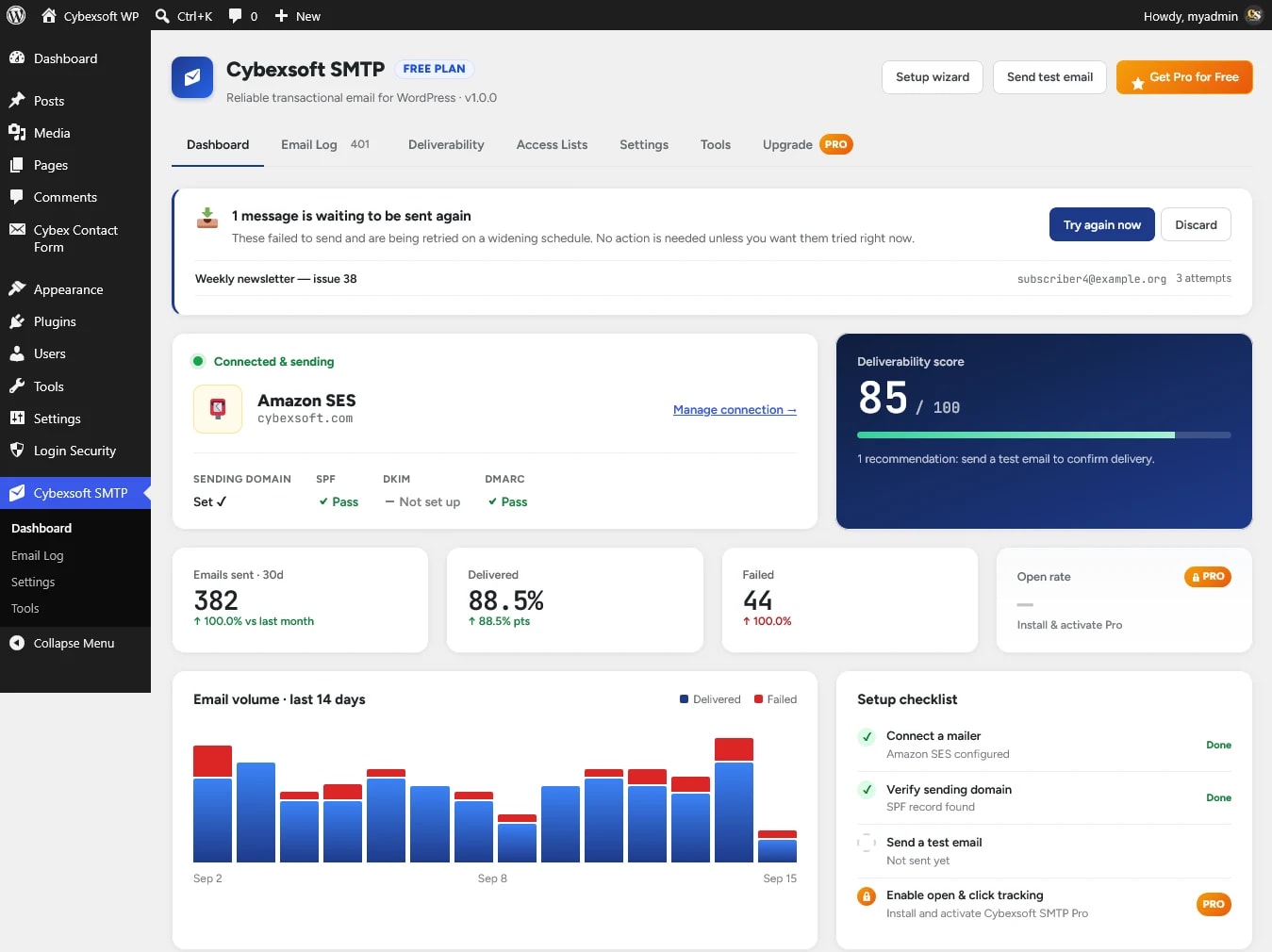
See Cybex WP SMTP in action.
Real screens from wp-admin — one settings page, so there is only one place to configure anything.
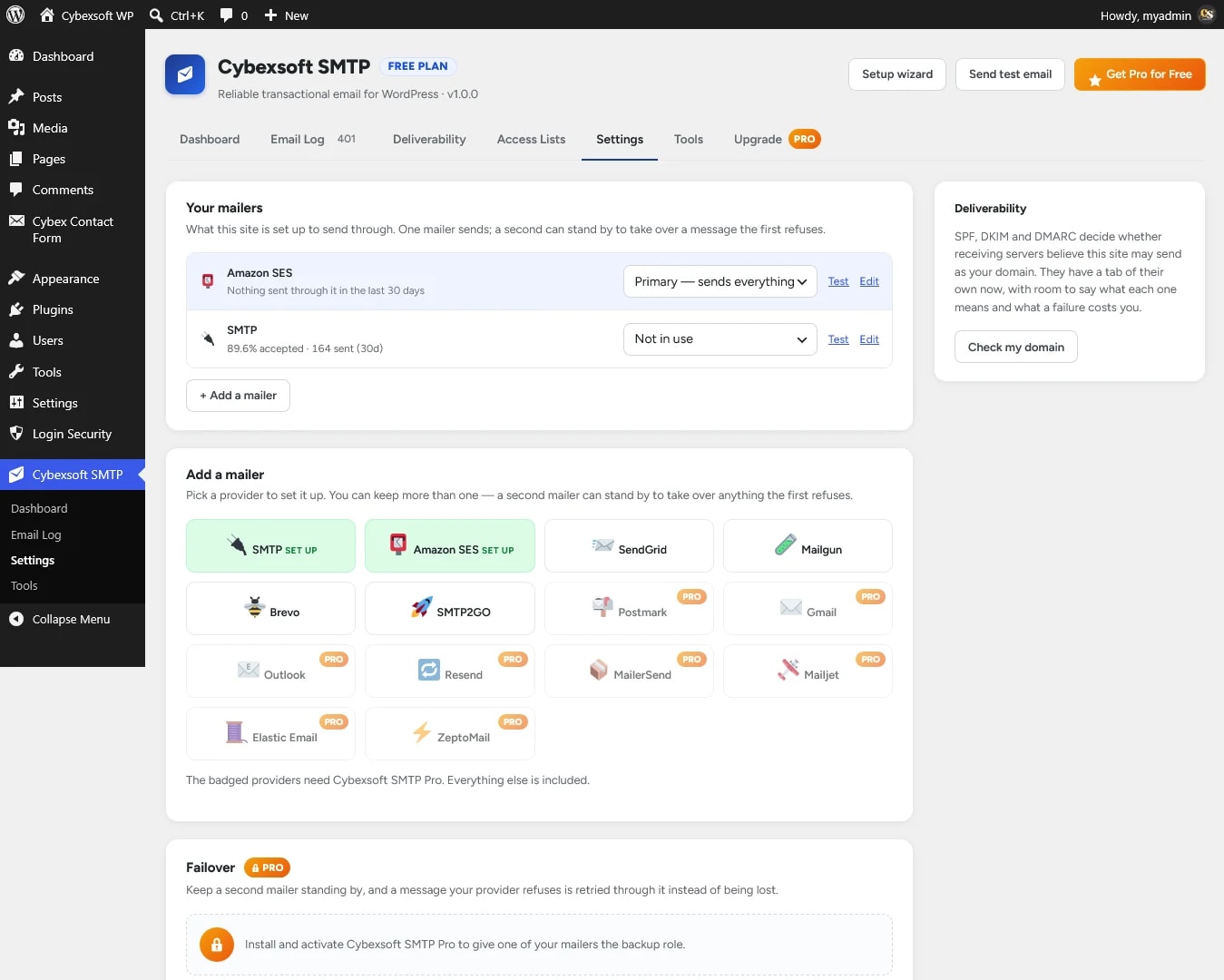
SMTP configuration
The mailers this site sends through and the role each one holds, a catalogue of providers to add, and the failover setting.
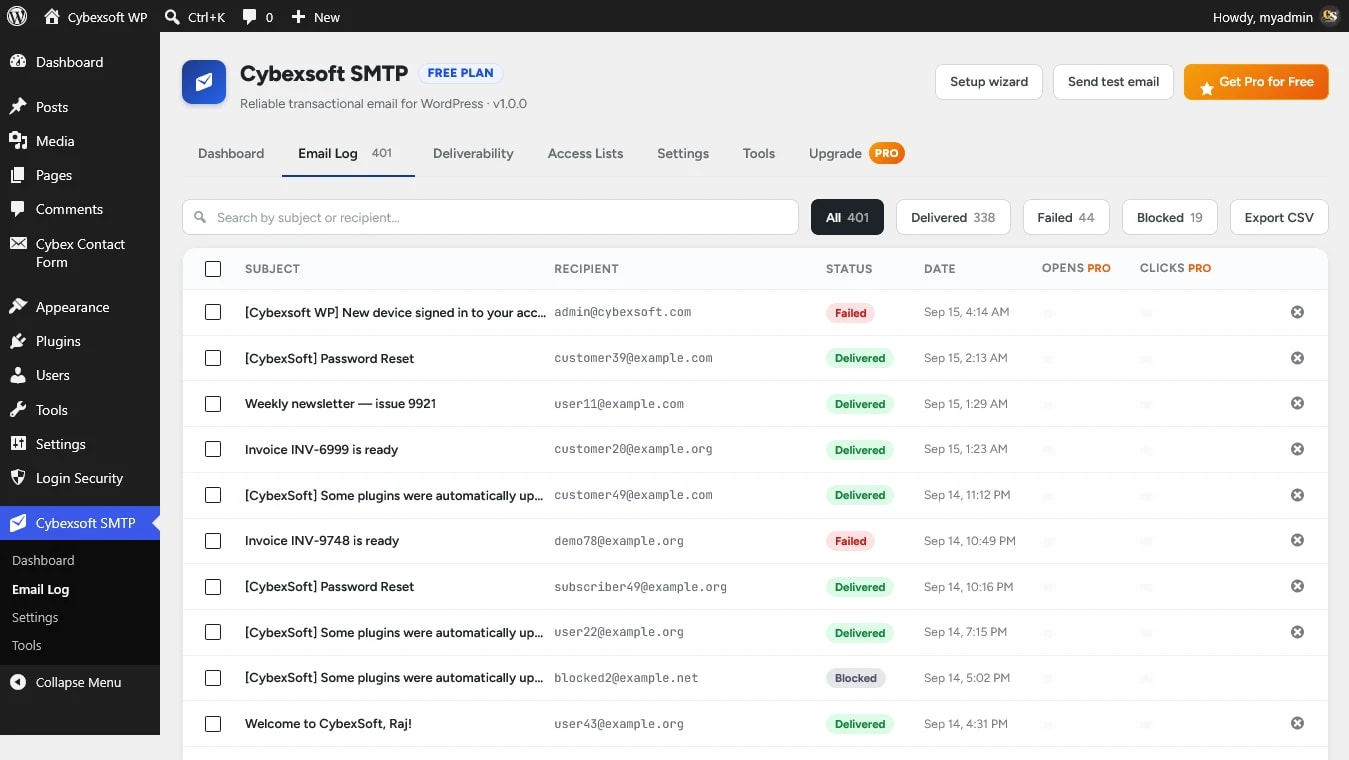
Delivery logs
Every message with its status, searchable by subject or recipient and filterable by delivered, failed or blocked. Export to CSV.
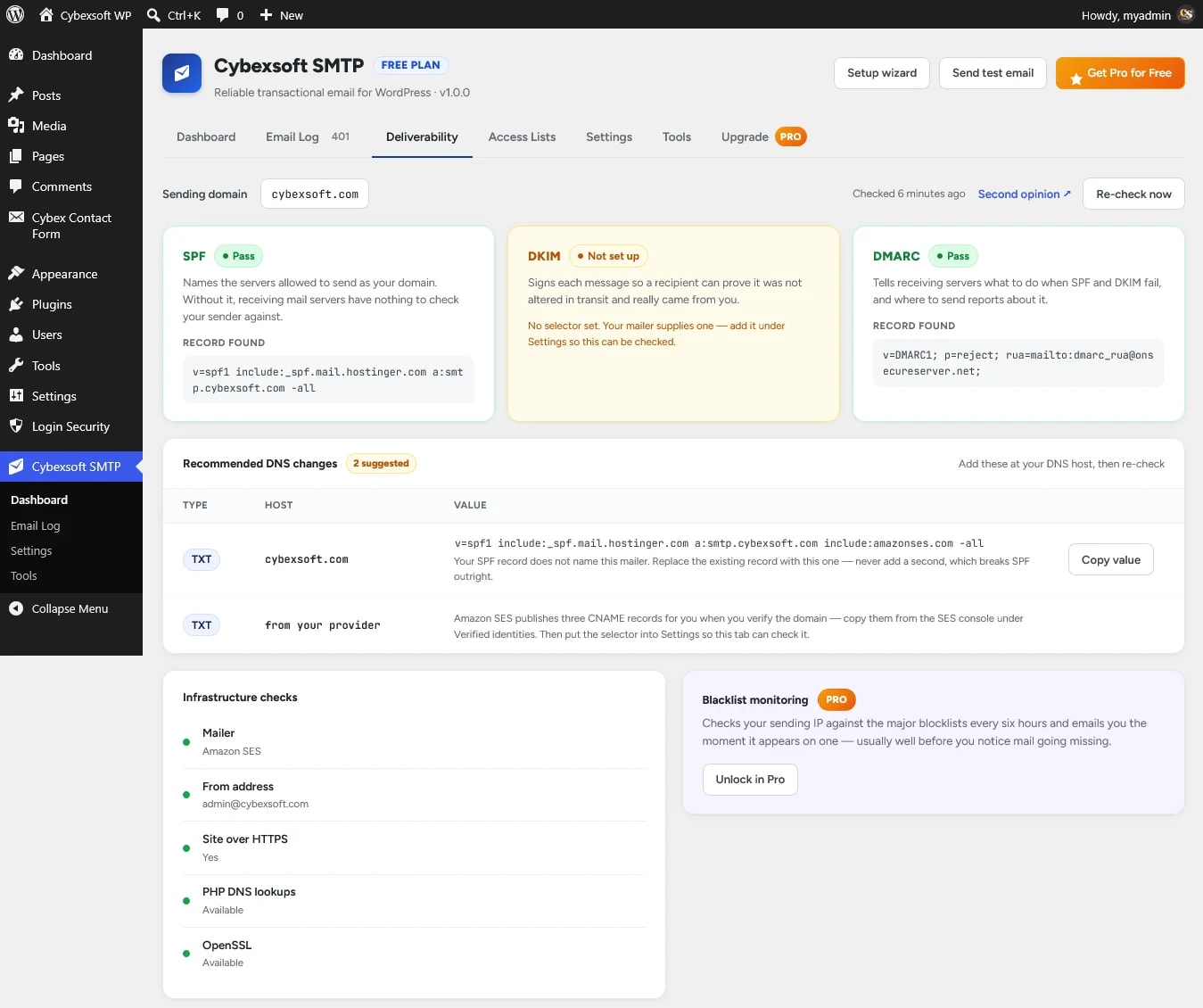
Domain health
SPF, DKIM and DMARC checked against your sending domain, the records found, and the DNS changes to publish.
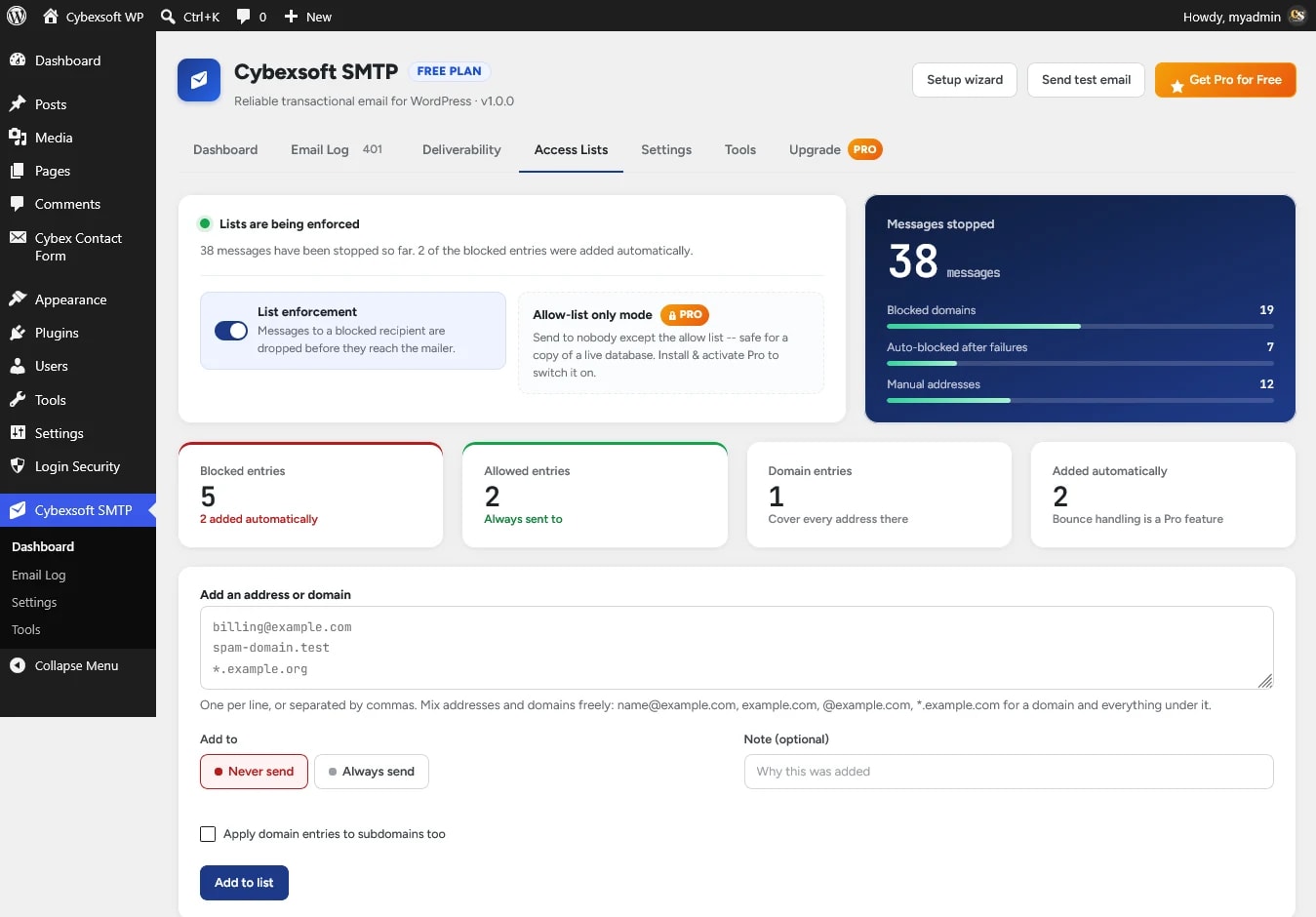
Allow & block lists
Stop mail to an address or domain before it reaches your mailer, and see how many messages each rule has stopped.
Set up in four steps.
Install
Install Cybex WP SMTP from WordPress.org and activate it.
Connect
Choose your SMTP or email provider and enter its details in the setup wizard.
Verify
Send a test email and check your SPF, DKIM and DMARC records.
Send
WordPress emails now go out through your provider — and every one is logged.
Free for sending. Pro for control.
The free plugin sends, logs and retries your mail and checks your DNS. Pro adds failover, engagement tracking, archiving, monitoring and advanced controls.
| Feature | Free | Pro |
|---|---|---|
| MailersPro adds Postmark, Resend, MailerSend, Mailjet, Elastic Email, ZeptoMail, and Gmail & Outlook over OAuth | 7 | 15 |
| Guided setup wizard | Included | Included |
| Test email & connection trace | Included | Included |
| SPF / DKIM / DMARC checks | Included | Included |
| Delivery logSearch, filters, CSV export, sending plugin | Included | Included |
| Automatic retry of failed mail | Included | Included |
| Failure alerts by emailPro: several recipients, your own window and quiet period | Included | Included |
| Allow & block lists | Included | Included |
| Encrypted credentials | Included | Included |
| Backup mailer & automatic failover | Not included | Included |
| Open & click tracking | Not included | Included |
| Message archive & re-send | Not included | Included |
| Log retention & pruning | Not included | Included |
| Auto-block repeated bounces | Not included | Included |
| Allow-list-only mode for staging | Not included | Included |
| Blocklist monitoring | Not included | Included |
| Weekly deliverability reports | Not included | Included |
| Support | Forum | |
| Download | Get Pro |
Built for every WordPress site.
WooCommerce stores
Order, invoice and shipping emails that arrive — and a log to prove it.
Business websites
Contact-form notifications that reach your inbox, not a spam folder.
Membership websites
Sign-up, password-reset and renewal emails your members can rely on.
Agencies
One setup routine for every client site, with Agency licences for up to 25 sites.
Developers
Credentials from wp-config.php, the sending plugin per message, and provider message IDs.
Staging sites
Pro’s allow-list-only mode stops a copy of a live site emailing real customers.
Your email infrastructure stays under your control.
- WordPresswp_mail()
- Cybex WP SMTPLog · retry · failover
- Your email providerSES, SendGrid, Mailgun, Brevo, SMTP…
- RecipientInbox
Sent through your provider
Mail goes from your site to the provider you configured. Cybexsoft is never a relay and never sees your messages.
Credentials stay on your site
Passwords and API keys are encrypted at rest with PHP’s sodium extension — or defined in wp-config.php and kept out of the database.
No message bodies by default
The log records recipient, subject and status. Pro’s content archive is off until you turn it on, and pruned after the days you set.
Retention you control
Pro prunes the log on a retention window you choose, and WordPress’s privacy tools can export or erase a person’s log entries.
The free plugin never contacts Cybexsoft. Pro sends only your licence key, site address and version to verify the licence.
One annual licence, sized by sites.
The price shown is what you pay — Indian orders include GST, everywhere else is tax-free. Renews at the same rate; the free plugin keeps sending if you stop.
Free
Unlimited sites
- 7 mailers & setup wizard
- Delivery log & automatic retry
- SPF / DKIM / DMARC checks
Pro Single
1 site
- Backup mailer & failover
- Open & click tracking
- Email support
Pro Studio
5 sites
- Everything in Single
- Use on up to 5 sites
- Under 2-hour response
Pro Agency
25 sites
- Everything in Studio
- Use on up to 25 sites
- Named support contact
“Very impressive feature set for a free SMTP plugin”
Excellent SMTP plugin! Lots of pro-level features are available for free. Easy to use and very reliable. Highly recommended for WordPress email delivery.
Compatibility.
- Free plugin
- Version 1.0.5
- Pro add-on
- Version 1.1.0
- WordPress
- 5.5 or later
- Tested up to
- WordPress 7.1.2
- PHP
- 7.4 or later
- WooCommerce
- Works through wp_mail()
- License
- GPLv2 or later
Cybex WP SMTP Pro 1.1.0
- Routing rules. Send some of your mail through a different mailer from the rest: a shop's order emails through one provider, contact-form mail through another. A rule matches on the From address, the recipient's domain, the plugin or theme that sent the message, or words in the subject; the first rule that matches picks the mailer, and everything else goes through your primary as before. Set rules up under Settings → Routing rules. The email log shows which rule routed each message, and the test email on Tools can be sent "as if from" a plugin to check a rule.
- Alert channels. Failure alerts can be posted to any number of channels as well as emailed: Slack, Microsoft Teams, Discord, or a webhook of your own (JSON). Each channel has its own quiet period, a "Send test alert" button, and a second message when sending works again. A message your backup mailer already delivered still raises no alarm.
- Two more mailers: Mandrill (Mailchimp Transactional) and SMTP.com. Mandrill's signed delivery reports are read, so its messages show Delivered, Bounced and Spam complaint in the log; SMTP.com's are not yet, so its messages stay "Sent". Delivery events also come in from SparkPost, now a free mailer.
Questions about Cybex WP SMTP.
Anything else? Write to contact@cybexsoft.com — someone who works on the plugin will answer.
A WordPress plugin that sends your site's email through an authenticated SMTP server or email provider instead of PHP mail(), logs every message, retries what fails and checks your domain's SPF, DKIM and DMARC records.
Yes. WooCommerce sends through WordPress's wp_mail(), so order, invoice and account emails go through Cybex WP SMTP with no extra setup — as do Contact Form 7, WPForms, Gravity Forms and other plugins that use wp_mail(). The log shows which plugin sent each message.
The free plugin supports any SMTP server, Amazon SES, SendGrid, Mailgun, Brevo, SMTP2GO and PHP mail. Pro adds Postmark, Resend, MailerSend, Mailjet, Elastic Email and Zoho ZeptoMail, plus Gmail and Outlook over OAuth.
Yes. It is GPL-licensed on WordPress.org with no time limit and no site limit, and includes the setup wizard, the email log, automatic retry, failure alerts, allow and block lists and the DNS checks.
Not to start sending. For good deliverability your domain should publish SPF, DKIM and DMARC records for your provider; the Deliverability tab checks them and tells you the exact record to add or change.
No. Mail goes from your site straight to the provider you configured. The free plugin never contacts Cybexsoft; Pro sends only your licence key, site address and version to verify the licence.
Pro features switch off until you renew, and updates stop. Your settings, log and data are left untouched, and the free plugin keeps sending through your primary mailer.
No. You still need an account with a provider such as Amazon SES, SendGrid or your host's SMTP server. The plugin connects WordPress to it and keeps a record of what happened to each message.
No. Pro is a separate add-on installed alongside the free plugin, so an update to either one never touches the other.
Ready to fix WordPress email delivery?
Start with the free plugin or unlock advanced monitoring and failover with Pro.