

Protect WordPress. See every attack it stops.
Login protection, file integrity, hardening and an activity log for WordPress, in one dashboard.
- Nothing on until you choose
- Safe-mode recovery
- Works on multisite
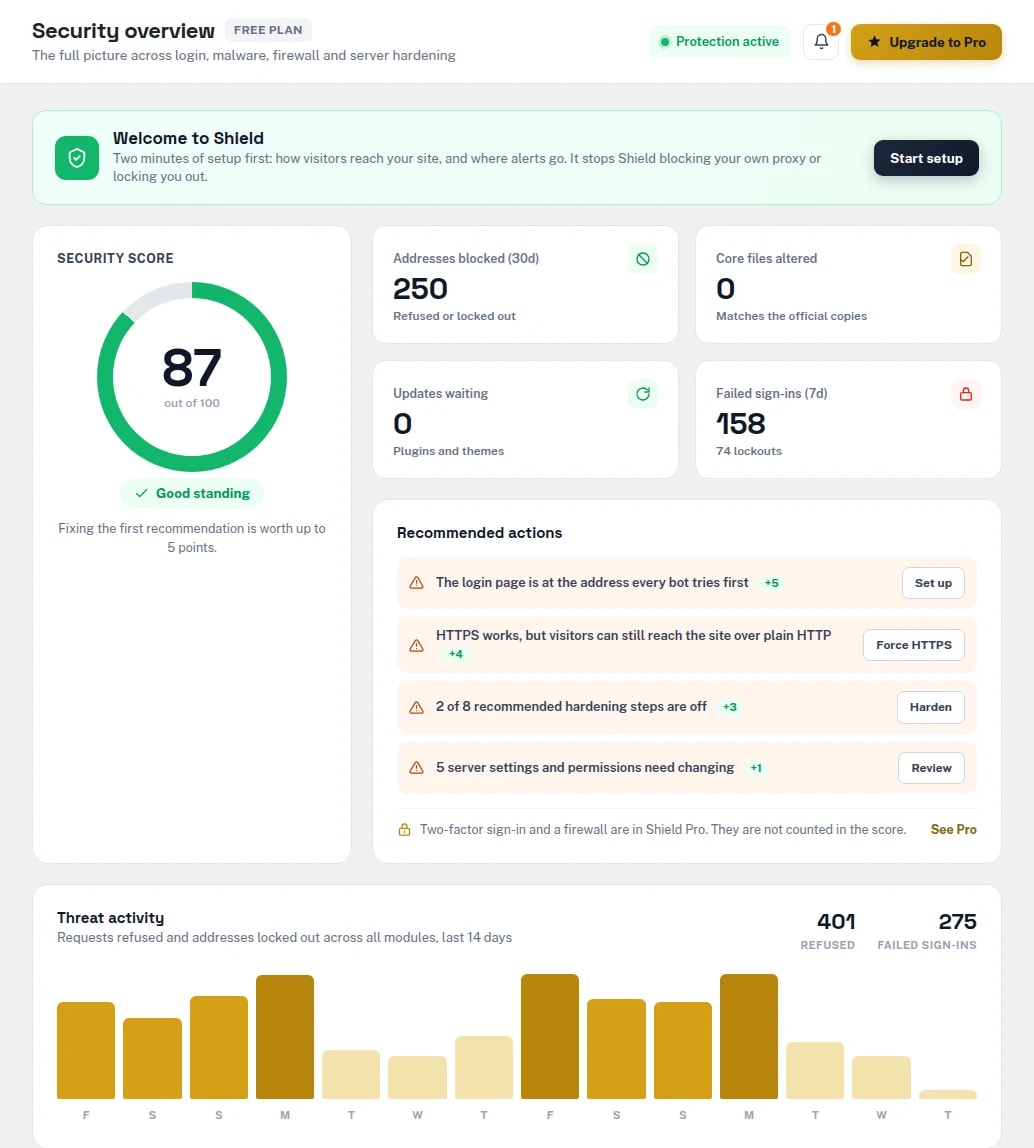
- Protection modules, free
- 11
- More modules in Pro
- 12
- Requires WordPress · tested to 7.1.3
- 5.8+
- Days of threat activity on the dashboard
- 14
What Shield covers
- wp-login.php
- Registration
- Lost password
- Comments
- WooCommerce login & checkout
- Contact Form 7
- XML-RPC
- REST API
- Built-in CAPTCHA
- Google reCAPTCHA v2 / v3
- Cloudflare Turnstile
- Cloudflare
- MaxMind GeoLite2
- WP-CLI
- Multisite
A [cybex_shield_captcha] shortcode puts the CAPTCHA on any other form. Shield reads the real visitor address behind Cloudflare or your host's proxy, and trusts a proxy only when it can verify it.
WordPress is a target the day it goes live.
Attacks on WordPress are automated and constant. Most succeed through the same few doors — and without a log, you find out from your visitors or your host.
Bots guess passwords all day
Every WordPress site has its login form at the same address, and scripts try it with common names and leaked passwords.
Changed files go unnoticed
A modified core file or PHP dropped into uploads looks like any other file until something goes wrong.
Defaults give too much away
The file editor, XML-RPC, user enumeration and the version number are all on or public out of the box.
Nobody knows who did what
WordPress keeps no record of sign-ins, role changes or plugin installs — so after an incident there is nothing to read.
Prevent, detect and harden — from one dashboard.
Cybex Shield puts every protection behind its own switch and shows you what each one is doing, so you can see it is working.
Stop the attempts
Login limits, a CAPTCHA, an invisible honeypot and IP rules turn away bots before they get a second guess.
- Per-account lockout
- Auto-ban rules for scanners
- Custom login URL
Notice what changed
Core and WordPress.org plugin files are checked against official checksums, and every sign-in and change is logged.
- File integrity with diff view
- Plugin & theme health
- Activity log with CSV export
Close the doors
One switch per hardening measure, a server audit with the exact fix, and SSL and security-header checks.
- Safe set in one click
- Snapshot before risky changes
- Security score with next steps
Everything a WordPress site needs to stay locked.
Five of these six are in the free plugin. Two-factor and the firewall are Pro.
- /loginFREE
Login protection
Attempt limits with per-account lockout, CAPTCHA, a honeypot, IP block and allow lists, and a blocked page with self-unblock by email.
- /sessionsFREE
Sessions & passwords
Password rules with a breached-password check that never sends the password, every signed-in session, timeouts and new-device alerts.
- /integrityFREE
File integrity
Core and WordPress.org plugins against official checksums, themes against their first scan, and code hidden in uploads — restore, quarantine or diff.
- /hardeningFREE
Hardening & server audit
Switches for the file editor, PHP in uploads, XML-RPC, user enumeration and more, plus a server audit that gives the line to fix each finding.
- /activityFREE
Activity log & score
Sign-ins, account, plugin and settings changes and everything Shield refused — filtered, searchable and exportable — with a score that says what to fix next.
- /proPRO
Two-factor & firewall
Authenticator apps, passkeys, email and backup codes by role, and a firewall against SQL injection, XSS and code execution that can run before WordPress loads.
See Cybex Shield in action.
Real screens from wp-admin, on a demo site. Each protection has its own page, with its settings beside what it has caught.
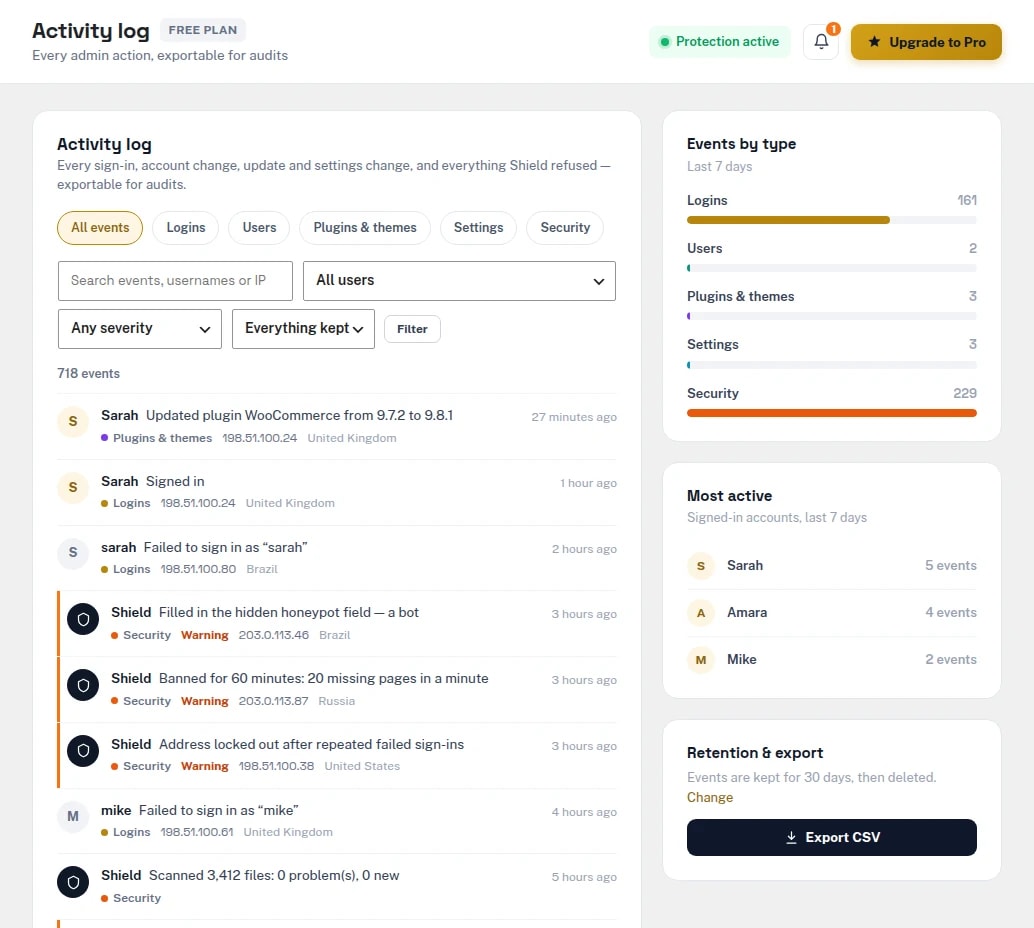
Activity log
Sign-ins, account, plugin and settings changes and every request Shield refused, with filters, search and CSV export.
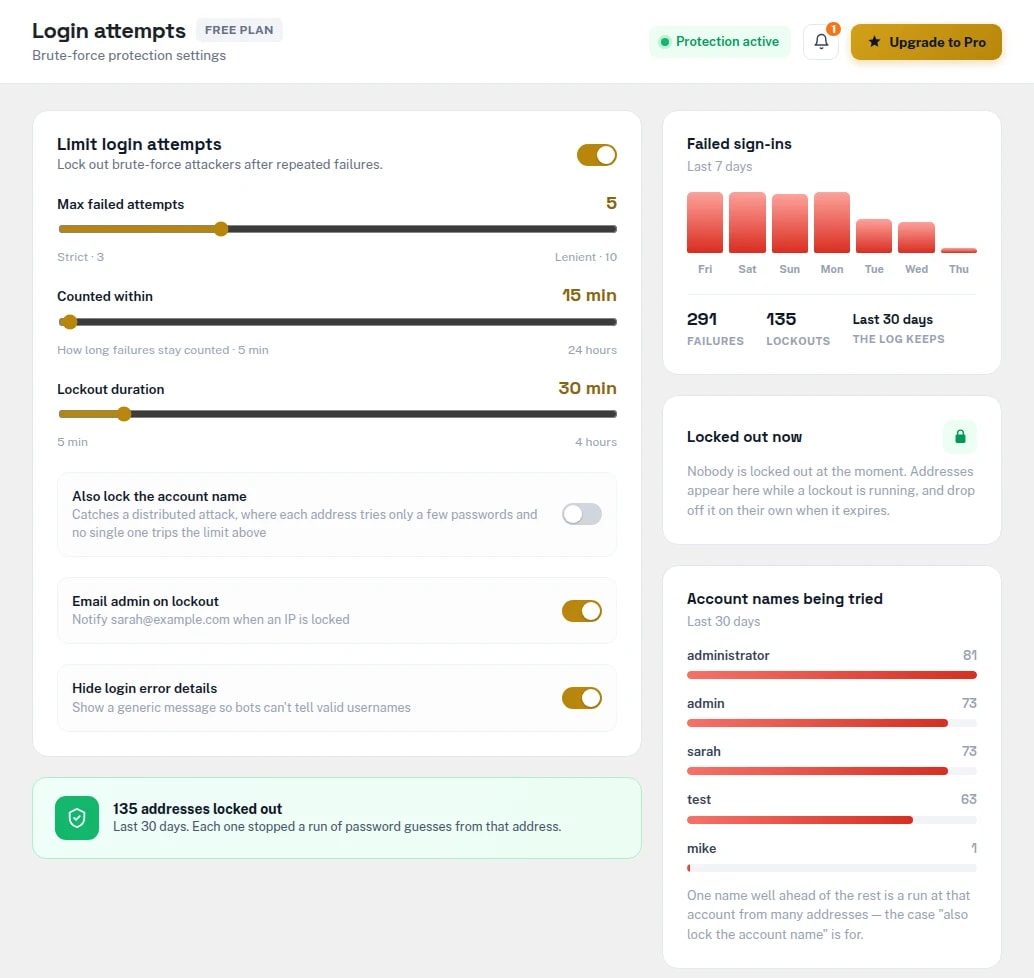
Login attempts
How many failures lock an address out and for how long, with failed sign-ins, lockouts and the account names being tried.
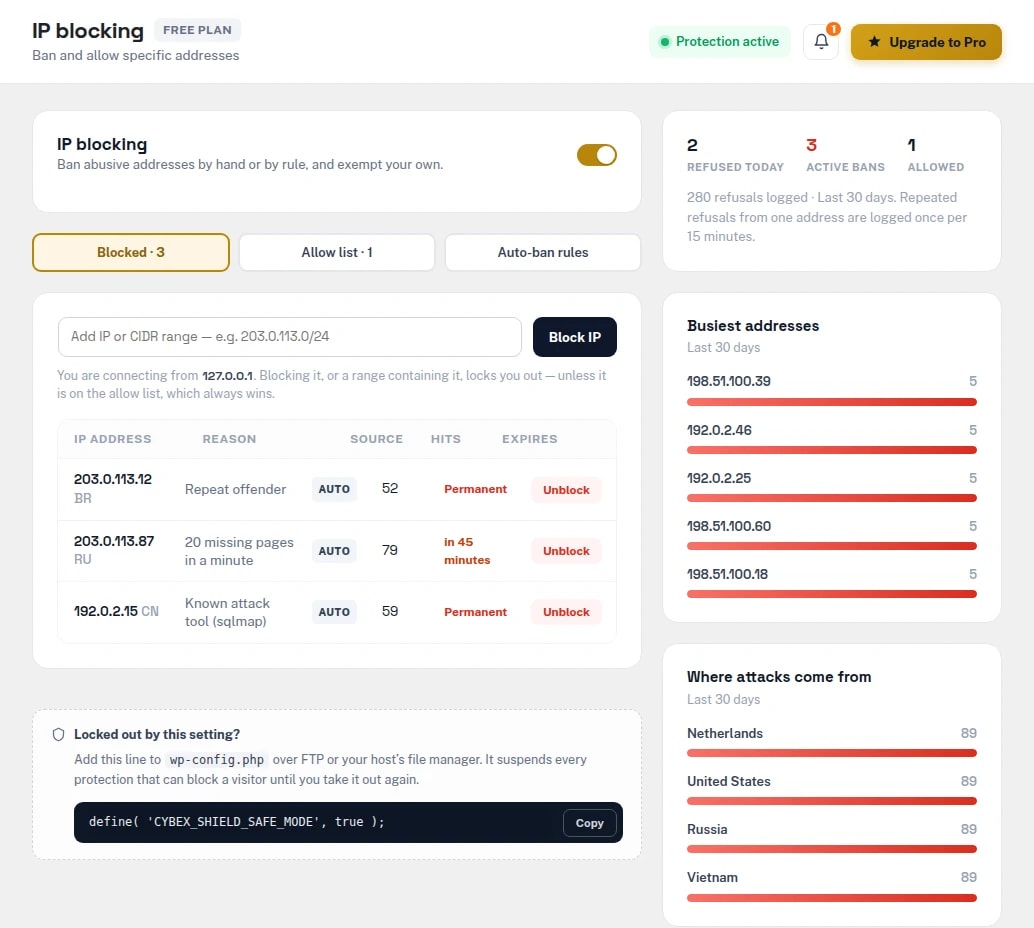
IP blocking
Block and allow lists, temporary and permanent bans, the rules that ban scanners automatically, and where attacks come from.
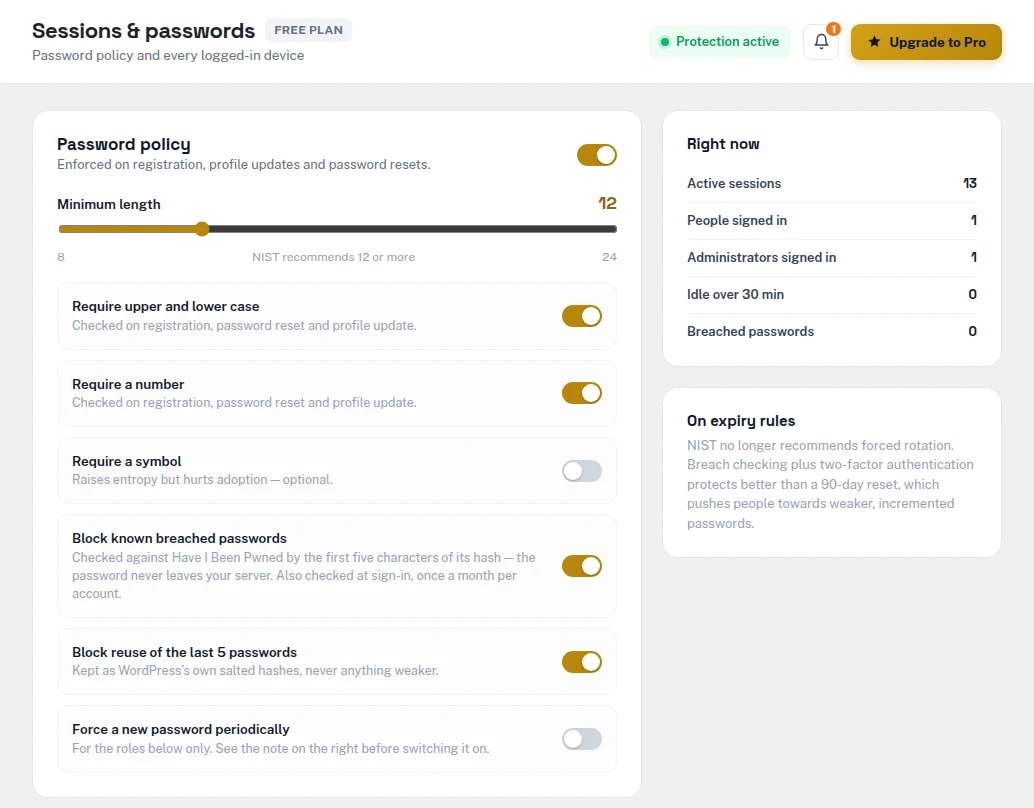
Sessions & passwords
Password rules with a breached-password check, and every signed-in browser with the option to sign it out.
Protected in four steps.
Install
Install Cybex Shield from WordPress.org and activate it. Nothing is switched on yet.
Set up
The two-minute wizard confirms how visitors reach your site and where alerts go, so Shield never blocks your own proxy.
Switch on
Turn on protections one by one, or the safe hardening set with one button.
Watch
The score, the activity log and email alerts show what Shield is stopping — and what to fix next.
Locked out? One line gets you back.
Security plugins can lock out their own owners — a CAPTCHA provider the server can't reach, an allow list missing the address you are on. Add one line to wp-config.php and every protection that can stand between you and your site is suspended, while logging and the settings screens keep working so you can fix the cause.
define( 'CYBEX_SHIELD_SAFE_MODE', true );wp shield status- Version, licence, safe mode and every module's state
wp shield disable <module>- Switch one protection off from the shell
wp shield unblock <ip>- Lift a ban on an address
wp shield logout --all- End every signed-in session
wp shield scan- Run the file integrity scan
wp shield settings export- Copy settings to another site
Free to lock down. Pro to defend actively.
The free plugin covers login, monitoring and hardening, and nothing in it is time-limited. Pro adds two-factor sign-in, a firewall, malware scanning and governance tools.
| Feature | Free | Pro |
|---|---|---|
| Login attempt limits & lockout | Included | Included |
| CAPTCHA & honeypotBuilt-in, reCAPTCHA v2/v3 or Turnstile | Included | Included |
| IP block & allow lists, auto-ban rules | Included | Included |
| Custom login URL | Included | Included |
| Password rules & session control | Included | Included |
| File integrity scanRestore, quarantine and diff | Included | Included |
| Plugin & theme health | Included | Included |
| Hardening, server audit, SSL & headers | Included | Included |
| Activity log & CSV export | Included | Included |
| Safe mode & WP-CLI | Included | Included |
| Two-factor authenticationAuthenticator apps, passkeys, email and backup codes | Not included | Included |
| Web application firewallCan start before WordPress loads, with learning mode | Not included | Included |
| Server rules for Apache & nginx | Not included | Included |
| Rate limiting & crawler control | Not included | Included |
| Malware scannerFiles and database, with one-click clean and undo | Not included | Included |
| Geo-blockingBy country and by network | Not included | Included |
| Settings audit trail & access controlSecond-admin approval for risky changes | Not included | Included |
| Alerts to Slack, Teams, PagerDuty, syslog & webhooks | Not included | Included |
| PDF reports, config profiles & compliance map | Not included | Included |
| Download | Get Pro |
Built for every WordPress site.
WooCommerce stores
A CAPTCHA on login, registration and checkout, and a record of every sign-in and account change.
Business websites
Brute-force protection and hardening that's switched on once and then left alone.
Membership websites
Password rules, session limits and new-device alerts for the people who sign in.
Agencies
Pro's config profiles carry one baseline from site to site and show where a site has drifted.
Developers & sysadmins
WP-CLI for every module, a server audit with the exact fix, and safe mode in wp-config.php.
Regulated teams
Pro maps your settings to PCI DSS, SOC 2 and ISO 27001 controls, with evidence for an auditor.
Security that runs on your server, not someone else's.
- Visitor or botLogin, form, request
- Cybex ShieldLimits · CAPTCHA · IP rules
- Your WordPress siteHardened, scanned
- Activity logEverything recorded
Nothing sent by default
The built-in CAPTCHA contacts nobody, and country lookups come from Cloudflare's header or a GeoLite2 database on your own server.
Passwords never leave
The breached-password check sends only the first five characters of a SHA-1 hash to Have I Been Pwned, and compares the answer on your server.
Privacy tools built in
Shield's records are in WordPress's export and erase tools, with suggested privacy-policy text and optional IP shortening.
Your data stays
Deactivating never removes anything, and deleting the plugin keeps your data unless you choose otherwise.
Cybexsoft is contacted only once a Pro licence key is entered, and then only with the key and your site address. reCAPTCHA, Turnstile and Safe Browsing are used only if you switch them on.
One annual licence, sized by sites.
The price shown is what you pay — Indian orders include GST, everywhere else is tax-free. Renews at the same rate; the free plugin keeps protecting your site if you stop.
Free
No licence needed
- 11 protection modules
- Activity log & security score
- Safe mode & WP-CLI
Pro Single
1 site
- Two-factor sign-in & passkeys
- Firewall & malware scanner
- Geo-blocking & audit trail
Pro Studio
5 sites
- Everything in Single
- Use on up to 5 sites
- One settings baseline across sites
Pro Agency
25 sites
- Everything in Studio
- Use on up to 25 sites
- Priority support
Compatibility.
- Free plugin
- Version 1.0.0
- Pro add-on
- Version 1.0.0
- WordPress
- 5.8 or later
- Tested up to
- WordPress 7.1.3
- PHP
- 7.4 or later
- Multisite
- Per-site settings and logs
- License
- GPLv3 or later
Cybex Shield Pro 1.0.0
First release.
- Adds to the free Cybexsoft Shield: two-factor authentication with passkeys, a firewall that starts before WordPress, rate limiting and crawler control, geo-blocking, server rules for Apache and nginx, a malware scanner, and governance tools (audit trail, access levels, alerts, reports, profiles and a compliance map).
- Requires the free Cybexsoft Shield plugin 1.0.0 or later. Install and activate it first, then upload this add-on and enter your licence key under Shield → Licence. Updates then arrive automatically under Dashboard → Updates while your licence is active.
Questions about Cybex Shield.
Anything else? Write to contact@cybexsoft.com — someone who works on the plugin will answer.
A WordPress security plugin: login protection, sessions and password rules, file integrity scanning, hardening, a server and SSL audit and an activity log, with a security score and one dashboard for all of it.
Add define( 'CYBEX_SHIELD_SAFE_MODE', true ); to wp-config.php. Every protection that can stand between you and your site is suspended while logging and the settings screens keep working. With shell access, wp shield disable <module> or wp shield unblock <ip> does the same for one module or one address.
Nothing is switched on until you choose. The setup wizard asks how visitors reach your site — directly, through Cloudflare or through your host's proxy — so Shield never blocks your own proxy, and one button turns on the safe set of hardening switches.
Yes. The CAPTCHA covers WooCommerce's login, registration and checkout forms and Contact Form 7, as well as WordPress's own login, registration, lost-password and comment forms. A [cybex_shield_captcha] shortcode adds it anywhere else.
Yes. Each site keeps its own settings, logs and block lists, and is configured by its own administrator.
Not by default. The built-in CAPTCHA contacts nobody and country lookups use Cloudflare's header or a GeoLite2 database on your own server. reCAPTCHA, Turnstile, the breached-password check and Safe Browsing are each optional and used only if you switch them on.
Yes. It is GPL-licensed on WordPress.org, and nothing in it is disabled or time-limited. Pro is a separate add-on plugin for two-factor sign-in, the firewall, malware scanning, geo-blocking and governance tools.
Pro features stop working until you renew, and Pro updates stop. The free plugin keeps everything it does, and your settings and logs are left in place.
It is kept, unless you switch on “Delete all data when the plugin is deleted” under Settings. Deactivating never removes anything.
Ready to lock down your WordPress site?
Start with the free plugin, or add two-factor sign-in, a firewall and malware scanning with Pro.